

Turn off pickup times
Hide pickup times for today when the kitchen cannot keep up.
Turn off single pickup times for today when the kitchen is busy. Customers cannot choose a scheduled time that you turn off. ASAP orders remain available while the store can prepare them before closing. The next day, every time that you turned off is on again.
Each store card on the dashboard home shows Today's pickup times. The times are 30 minutes apart.
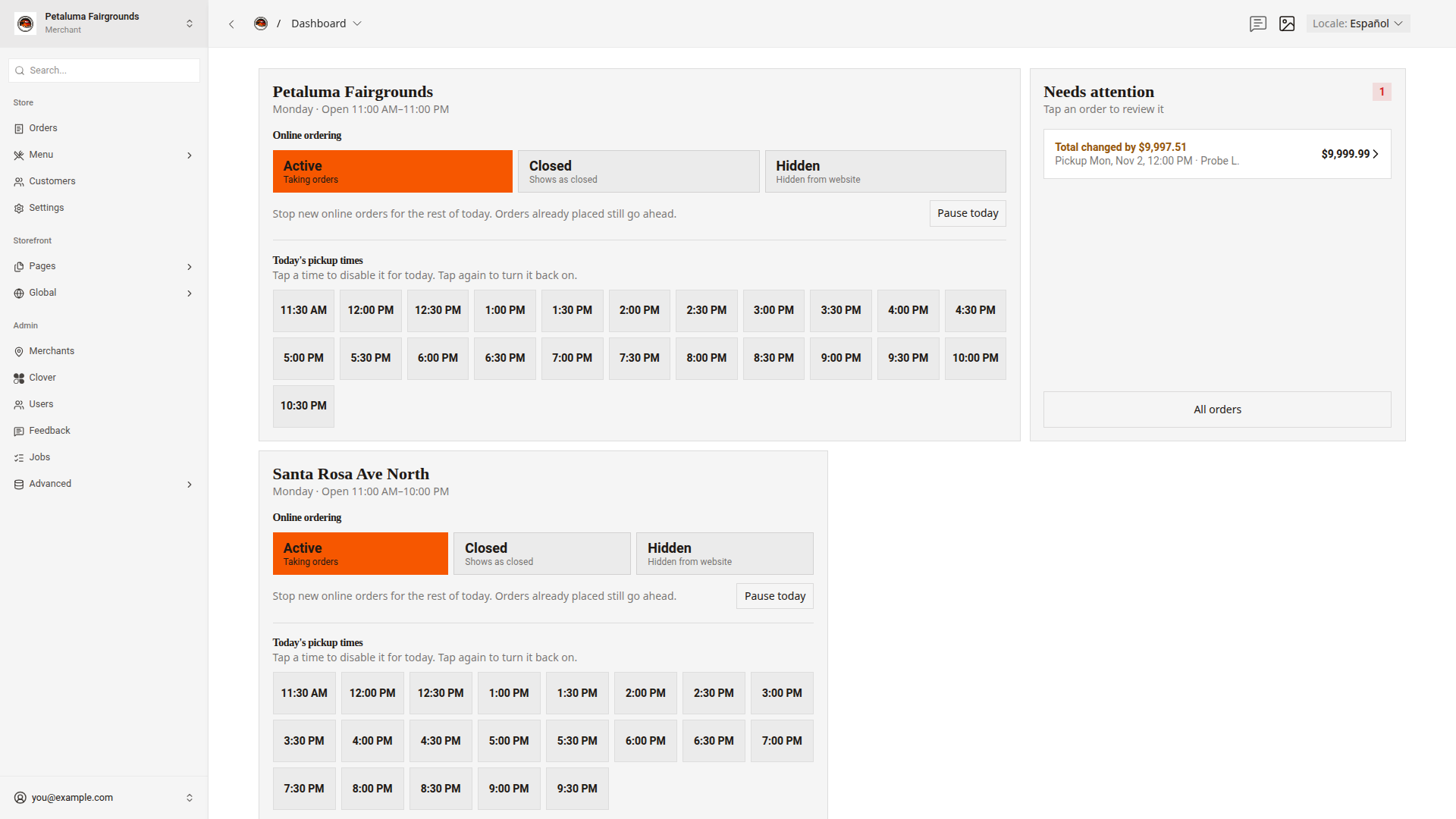
Turn off a pickup time for today
- On the dashboard home, find the store's card.
- Under
Today's pickup times, click the time.
The time turns red and shows Disabled. A message shows the time and "disabled for today", such as "2:30 PM disabled for today". A count next to Today's pickup times shows how many times are off, such as "1 disabled".
Turn a pickup time back on
- Under
Today's pickup times, click the time again.
A message shows the time and "enabled for today". To turn a time back on right after you turn it off, you can also click Undo in the message.
Good to know
- A time that shows
Lockedis off every day or on this weekday. Point at the time to see "Disabled in Settings or the weekly schedule". Store settings and Set ordering times show how to change it. - Orders already placed for a time that you turn off still go ahead.
- To stop new orders for today's pickups, use
Pause today. Open, close, or pause a store shows how. - The last pickup time is 30 minutes before online orders close.